SORTING PIECES · 8 MIN READ
How to Sort Jigsaw Puzzle Pieces: Edges, Colour, Shape (and When to Stop)
The short answer: pull out the edge pieces first, then group the rest by distinctive details and colour, and sort whatever is left by shape. Keep to a few groups, and stop sorting as soon as finding a piece by eye is quicker than deciding where it belongs.
A pile of pieces is easier to work through once it is split into smaller ones. But every minute spent sorting is a minute not spent building, so the aim is just enough sorting to make the next piece easy to find.
The method below works the same for a cardboard puzzle on the kitchen table as for a jigsaw app. I make the digital jigsaw game Puzzle Peace, so the examples use its 576-piece Autumn Retreat puzzle and show where its sorting tools can do a step for you. If you are sorting by hand, the tips for physical puzzles are alongside.
1. Study the picture before you sort
Spend a minute with the box lid or reference image. Look for areas you would recognise from a fragment the size of one piece: an object, a strong line, a texture or a change from light to dark. These areas become your first groups.
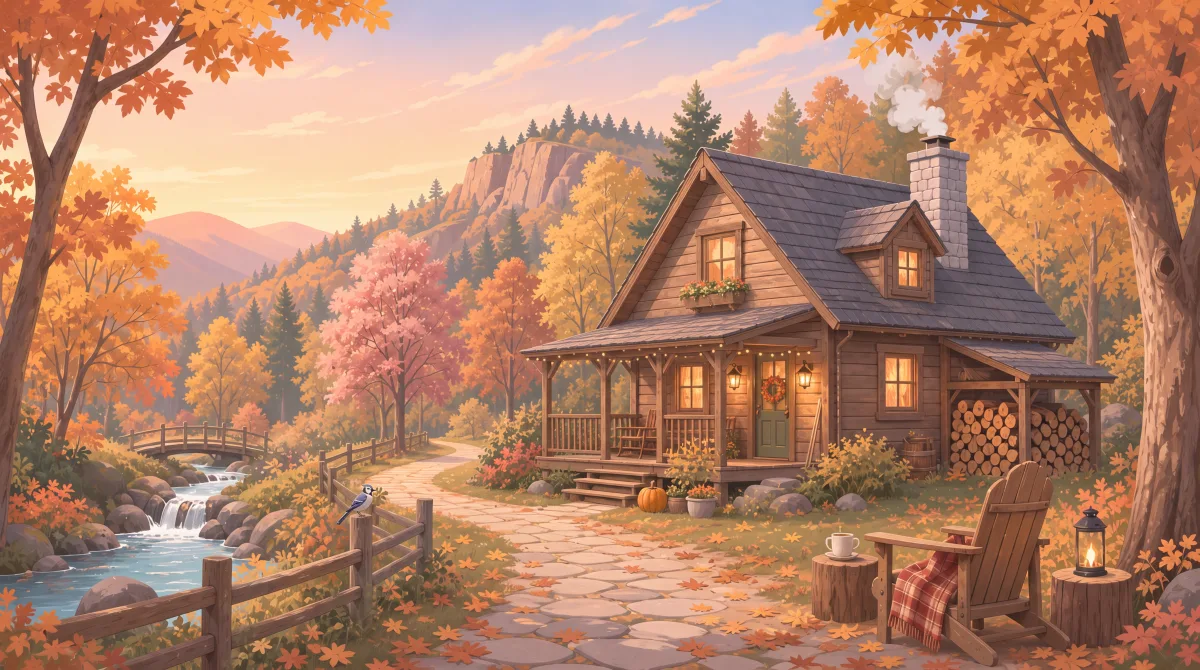
Autumn Retreat has plenty of these. There is the cabin’s dark roof and lit windows, the stacked woodpile, the stream and footbridge, the grey stone path, the fence, the plaid blanket and the blue jay. The orange foliage and the pale sky cover far more of the picture but tell you much less, so leave those for later.
2. Pull out the edges first
Edge pieces have one straight side and corners have two. They are a small share of the box: a 1,000-piece puzzle has only about 126 edge pieces, roughly one in eight. In Autumn Retreat at 576 pieces, 96 are edges. Picking them out takes one pass and gives you a frame to build from.
On a table: turn every piece picture-side up during the same pass, so you only handle each piece once. Put the edges in a box lid and the four corners to one side.
In Puzzle Peace: Smart Sort can gather the edge pieces into a tray. Docking the tray beside the table keeps the border pieces in a separate, smaller pile.
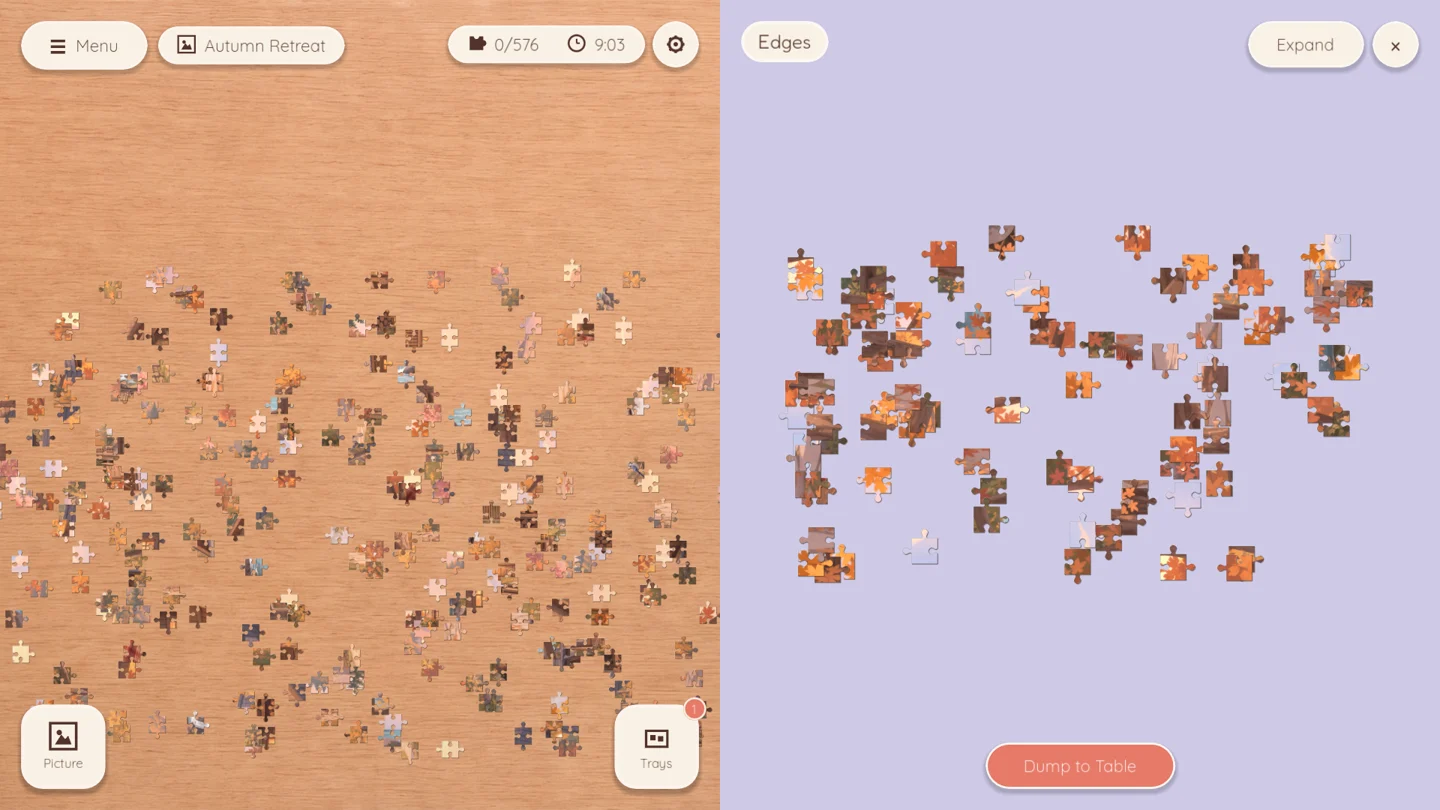
Smart Sort is part of the free Puzzle Peace base game, on Steam for Windows and macOS and on the App Store for iPad.
You do not have to finish the border before anything else. If several edges look alike, such as a long run of sky, build a distinctive interior section first and come back to the border once it gives you more clues.
3. Group distinctive details, then broad colours
Next, collect pieces that show the things you spotted in step 1. In Autumn Retreat, that means the roof’s dark diagonal, the warm rectangles of the windows, the stripes of the woodpile and the blue of the stream. Small groups of distinctive pieces assemble quickly and give you anchors across the picture.
Then split what remains by colour, but only where it narrows the search. A broad “orange” pile might hold leaves from five different trees. A smaller pile of orange leaves against pale sky tells you much more about where those pieces go. Sort by what a piece shows, not just its strongest colour.
The plain areas are worth separating too. Pieces of sky, water or a soft background look alike, so it helps to keep them apart from the busy pieces until you are ready for them.
On a table: paper plates, baking trays, muffin tins and box lids all work as sorting trays, and stackable trays keep your table clear. Label a tray with a scrap of paper if two piles look similar.
In Puzzle Peace: Smart Sort can also make a tray from one colour, or from the plain or detailed pieces. You can combine the options, for example to get the detailed interior pieces in a single colour.
4. Keep it to a few groups
Start with four to six groups. Split one again only when it is too crowded to scan comfortably. If you spend more time deciding which tray a piece belongs in than looking for a match, you have too many groups. Combine some and go back to building.
Work from one group at a time and keep the others out of the way. Leave space around the section you are building so you can lay candidate pieces next to it.
5. Sort by shape when colour stops helping
Eventually you reach pieces that all look the same: the last stretch of sky, the deep middle of the foliage. Now sort by shape. Each side of an interior piece has either a knob (also called a tab) sticking out, or a hole (also called a blank) cut in. That gives six basic piece shapes:
- 4 knobs
- 3 knobs, 1 hole
- 2 knobs side by side
- 2 knobs opposite
- 1 knob, 3 holes
- 4 holes
Lay the remaining pieces out by shape, in rows or separate trays. Then choose a gap next to pieces you have already placed and read its outline. Wherever a neighbour’s knob pokes into the gap, the missing piece needs a hole there. Wherever the neighbour has a hole, it needs a knob. Now you only have to search one shape group, not the whole pile.
The mix of shapes varies between puzzles, and in some cuts one shape makes up a large share of the pieces. Shape works best as a last sort, applied to the pieces that colour and detail could not separate.
In Puzzle Peace: select a piece and press the Matching Shapes button. It collects every unplaced piece cut the same way, in any orientation, into its own tray. Once you know what shape a gap needs, find one piece with that cut and let the tool gather the rest. You still pick the right one by checking the picture and its neighbours.
For a stubborn patch of sky, start where it meets something else, such as a branch, the roofline or the border, and build outward from that known position. In dense foliage, look for a light-to-dark transition or a line that continues across a piece’s edge. If neither shape nor picture helps, try a different gap and come back when more neighbours are in place.
A simple order to try
- Study the picture and list the areas you would recognise from one piece.
- Pull out the edges, turning every piece picture-side up as you go.
- Group distinctive objects, lines and textures.
- Split broad colours, and plain from busy pieces, only where it helps.
- Keep to four to six groups and work from one at a time.
- Sort the remaining look-alike pieces by shape.
When to skip the sorting
Small puzzles barely need it. In a 40-piece puzzle, 22 of the 40 pieces are edges, so pulling them out just splits the pile in half. With a small puzzle or a very distinctive image, start placing the matches you can see straight away.
The same goes for any puzzle once you notice that you have stopped building. Sorting is something to come back to when the table gets hard to scan, not a rule to complete before you play.
If you are choosing an app, check whether its trays and sorting tools are included or sold separately. My guide to choosing a jigsaw puzzle app without ads covers those questions, along with purchases and platform support.
Frequently asked questions
Should you sort puzzle pieces by colour or by shape?
Colour and detail first, shape last. Colour splits the pile into areas of the picture, which is usually the bigger win. Shape helps most at the end, when the remaining pieces look alike, such as a large sky or a dense patch of leaves.
Do you have to do the edges first?
No, but it is usually worth pulling them out first, because edges are a small, easy-to-spot share of the pieces. Building the border is optional. If the edges are all similar sky or shadow, start with a distinctive interior area instead.
What is the fastest way to sort a 1,000-piece puzzle?
Make one pass to turn every piece picture-side up and pull out the roughly 126 edge pieces. Then make a second pass into four to six groups based on the picture’s most distinctive areas. Leave the look-alike pieces in a single pile and sort them by shape only when you reach them.
What can I use to sort puzzle pieces?
Box lids, paper plates, baking trays and muffin tins all work. Stackable sorting trays and a roll-up puzzle mat help if you need to clear the table. In a jigsaw app, look for trays and sorting tools that can gather edges, colours or shapes for you.
How do you find a piece when they all look the same?
Switch from the picture to the outline. Work out which knobs and holes the gap needs, then compare only pieces with that shape. Build outward from a known position, like a border or the edge of an object, and move to a different gap if one stalls.
Try these sorting tools in Puzzle Peace
Every tool in this guide is in the free Puzzle Peace base game, with no ads or subscriptions. That includes Smart Sort, Matching Shapes and trays. Each pack has a free 40-piece sample puzzle where you can try them. Autumn Retreat, the 576-piece scene in this guide, is part of the Cozy Classics pack. Owned packs let you choose sizes up to 1,296 pieces.
The free Daily Puzzle switches Smart Sort and Matching Shapes off so that everyone solves it on equal footing. That makes it a good place to practise sorting by hand.
Puzzle Peace is available now for Windows and macOS on Steam, and for iPad on the App Store.